
Using an AI coding assistant has come with a small chore: picking the model. The cheap fast one for a quick rename, or the expensive frontier model for a gnarly bug? On Wednesday GitHub said it will now make that choice for you.
GitHub Copilot Fusion became generally available on 28 October, announced on day one of GitHub Universe. It isn’t a new model. It’s a layer above the models that decides, for each prompt, which ones to use and whether a second model should check the first one’s work. The headline claim: on an independent coding benchmark, Fusion’s top setting landed within two points of Claude Code running Claude Opus 5.5, at about half the cost per task.
It has been one of the most-discussed AI developer stories of the past day. X counted about 1,200 posts mentioning “Copilot Fusion” in the first 20 hours after launch, at a steady 40 to 65 an hour. Artificial Analysis’s benchmark post passed 99,000 views, and Microsoft CEO Satya Nadella promoted it twice. Here’s what Fusion does, who gets which version, and what “half the cost” really means.
What Copilot Fusion is
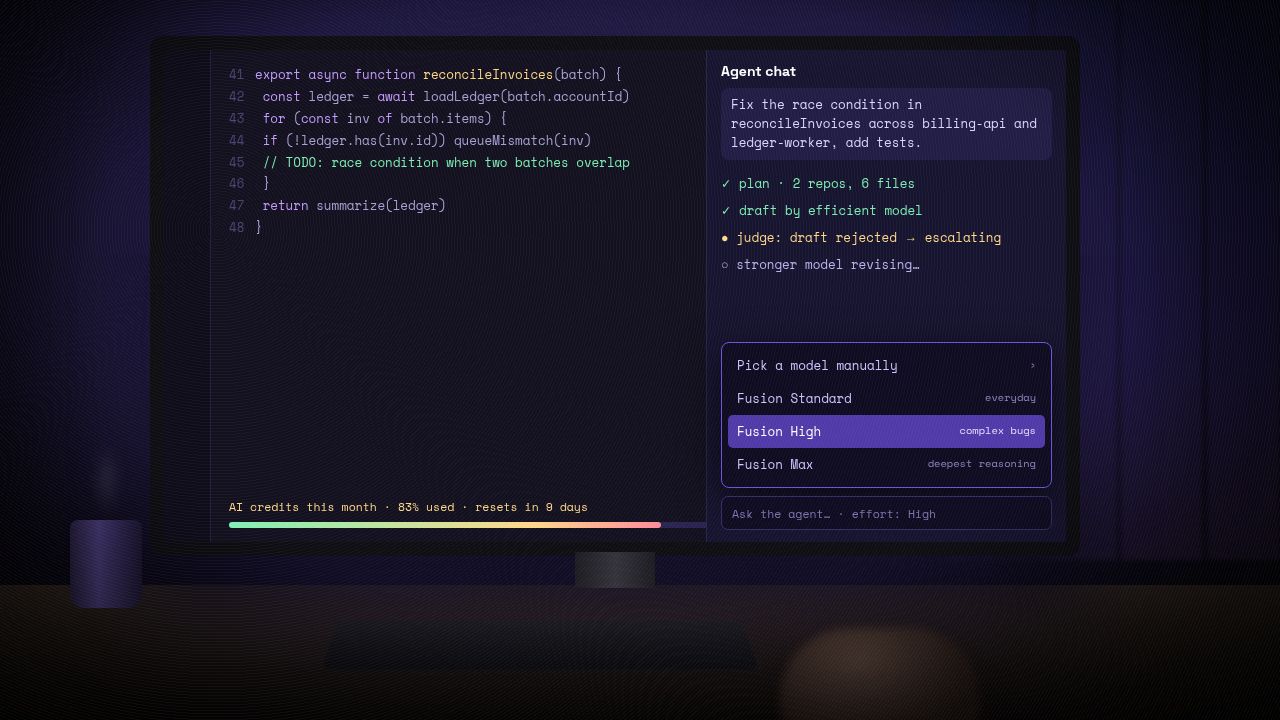
GitHub’s documentation calls Fusion “an intelligent runtime model router and orchestrator.” In practice you open the model picker in VS Code, JetBrains IDEs, the GitHub Copilot app or Copilot CLI, choose Copilot Fusion instead of a named model, and then choose an effort level. GitHub says that from then on there’s “no need to switch models during a task or decide which model suits each step.”
It merges two earlier GitHub efforts: Auto model selection, which matched a task to one suitable model, and Project HydraFusion, a 4 September research preview in which models drafted, critiqued and escalated work between them.
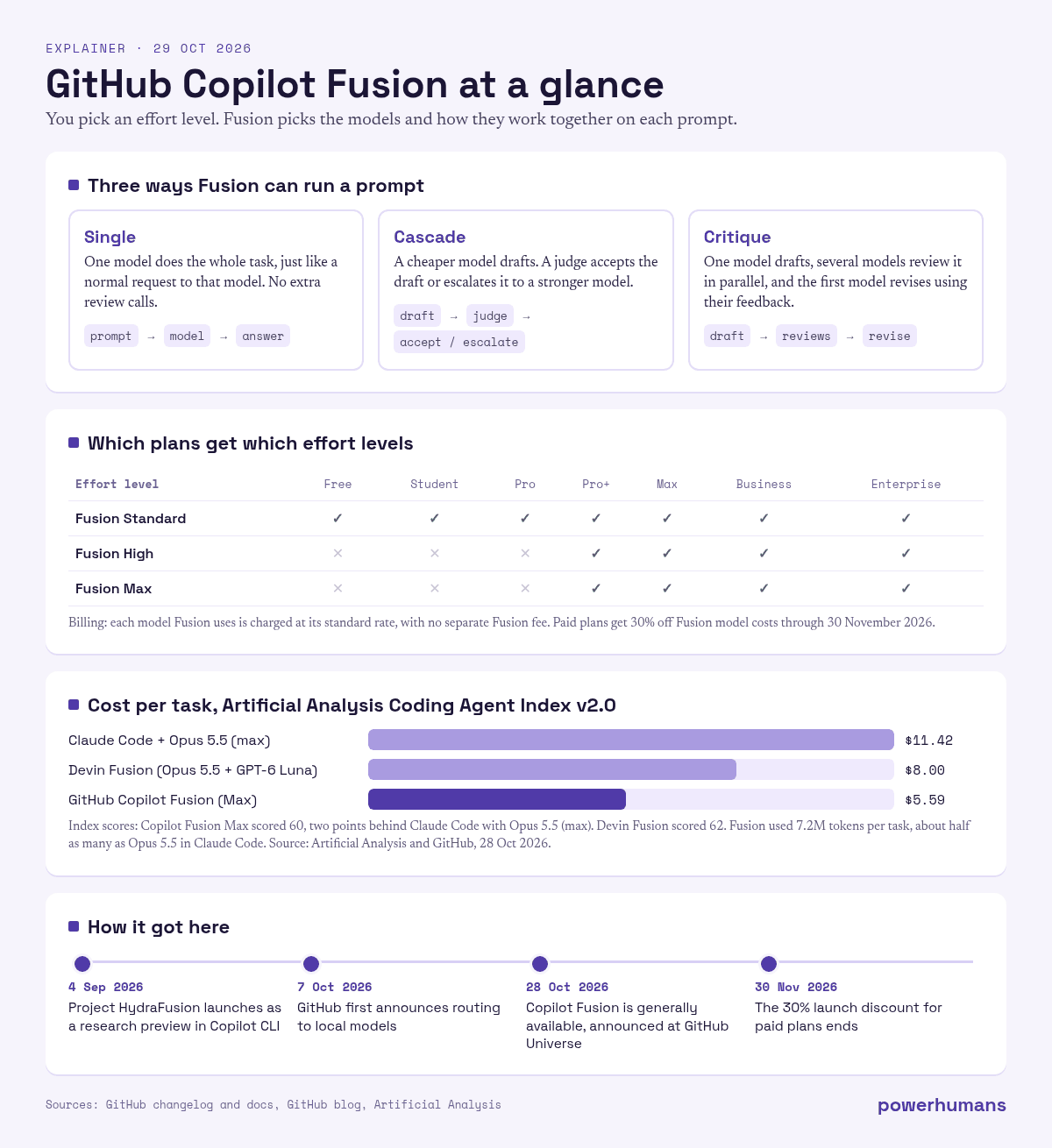
For each prompt, Fusion picks one of three execution patterns:
- Single: one model handles the task, which GitHub says works like an ordinary request to that model.
- Cascade: a more efficient model writes a draft. A judge then accepts it or escalates the task to a stronger model.
- Critique: one model drafts, several models critique it in parallel, and the original model revises using their combined feedback.
The pattern can change from prompt to prompt, and GitHub says Fusion “only adds model calls when a task warrants them.” According to Artificial Analysis, the model pool currently includes Claude Opus 5.5, Claude Sonnet 5.5, GPT-6 Astra and GPT-6 Sol. GitHub says that list will change as new models arrive. Once a response is finished, you can hover over the effort level beneath it to see which models were used.
Standard, High and Max: who gets what
The effort levels are the main control you get:
- Fusion Standard balances cost, quality and latency, and picks one model per task. It is meant for everyday work.
- Fusion High is for “substantial, well-scoped coding tasks,” such as a complex bug or a change across several files, where extra model calls may be worth the time and credits.
- Fusion Max aims for frontier capability “while still considering token efficiency,” for the hardest reasoning work.
A fourth level, Fusion Fast, can’t be selected. It runs only in VS Code’s inline chat.
Read the fine print. According to GitHub’s plan table, Fusion Standard is available on every Copilot plan, including Free, Student and Pro. Fusion High and Fusion Max are limited to Copilot Pro+, Copilot Max, Business and Enterprise. If you’re on the free tier, the version that earned the benchmark headlines isn’t available to you.
The “half the cost” claim, checked
GitHub’s number comes from the Artificial Analysis Coding Agent Index, which scores full coding agents (the model plus the tool wrapped around it) on three benchmarks. GitHub says Fusion Max scored 60, within two points of Claude Code with Opus 5.5 Max, “at about half the average API cost per task, using about half as many tokens and taking about 40% less time per task.”
Artificial Analysis’s own write-up supports the cost figures and adds some detail. In its testing, Fusion cost $5.59 per task, against $11.42 for Claude Code with Opus 5.5 (max), and used 7.2 million tokens per task, roughly half of what Opus 5.5 used in Claude Code. Fusion’s results were uneven across the three benchmarks. It narrowly led Terminal-Bench 4.0 with 71. It came third on FrontierCode with 51, behind Claude Code with Opus 5.5 (56) and Cognition’s Devin Fusion (54). It lagged on SWE-Atlas-QnA at 57.
GitHub isn’t alone in mixing models. Cognition’s Devin Fusion, which pairs Opus 5.5 with a cheaper GPT-6 Luna “sidekick,” scored 62 at $8.00 per task. Copilot Fusion isn’t the top scorer on this index; it’s the cheapest route to that tier.
Microsoft is pitching the savings harder than the benchmark does. Nadella wrote on X that Fusion “delivers frontier-level quality, 40% faster and at up to 77% lower cost.” “Up to” is doing a lot of work in that sentence. The independent per-task figure is closer to 51% cheaper.
How billing works
Fusion has no fee of its own. GitHub’s docs say you’re “billed for each model it uses, at that model’s standard rate.” That cuts both ways. Fusion can save money when a cheap model’s draft is good enough. On High and Max, though, a single task can call several models, and GitHub warns it “may consume more AI credits than it would with Fusion Standard.” Until 30 November 2026, users on paid plans get 30% off model costs when they use Fusion.
The launch also ties into a pricing change GitHub announced the same day. GitHub Enterprise customers who work with a sales team can now get Copilot features without buying a separate Copilot subscription. They pay for the AI credits they use. When every request is metered, a router that cuts token use becomes a budget line, which helps explain why Nadella highlighted Fusion on Microsoft’s earnings day, calling “maximizing intelligence per task” the next frontier.
Hari Pokhrel, a principal software engineer at AT&T, said in GitHub’s announcement that developers “would often choose a more powerful model for a complex task and forget to switch back for everyday activities.” Fusion Standard, he said, removed that friction.
Local models, and the limits
An experimental option also lets Fusion Standard send some work to a model on your own machine: Microsoft’s MAI Code 1.1 Flash (downloaded for you on supported Windows PCs), or MAI Code 1.1 Flash or Qwen3.8 Flash Next via a local server in Copilot CLI on Windows, macOS or Linux. Routing decisions still happen in the cloud, and GitHub warns local models “may have different safety protections.”
The docs also list limits worth knowing before you hand Fusion a big job:
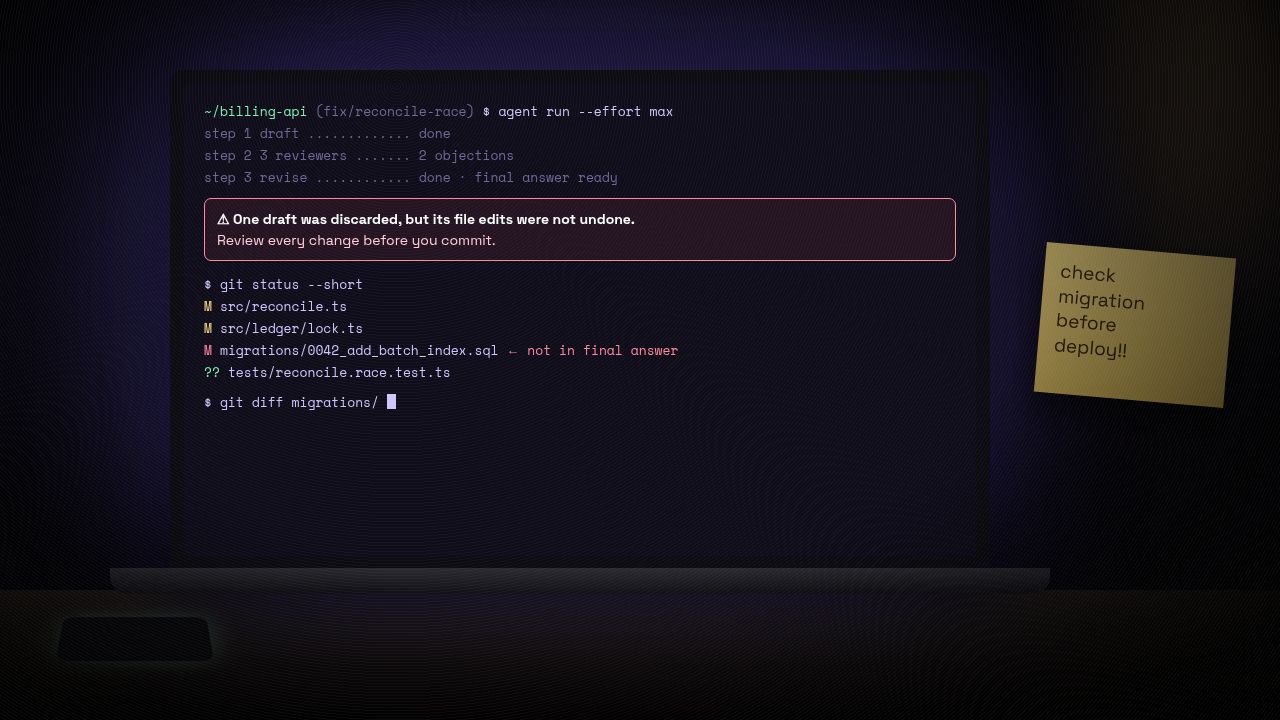
- If Fusion throws away a draft, any file edits that draft already made “aren’t undone automatically.” GitHub’s advice is to review changes before you commit them.
- Fusion doesn’t start subagents and runs separately from them.
- Admins decide which models it can use. Fusion only picks from models enabled by your organisation’s policies, and enterprise admins can exclude a model from Fusion without disabling it for everyone, or make Fusion the default.
The skeptics’ case
Not everyone is impressed. One widely shared reply on X argued that “slightly cheaper only slightly matters” and predicted that open-weight models will drive costs down far more than routing can. That debate is real. We saw it when Kimi K3.1 Pro came close to Claude Opus 5.5, although Artificial Analysis’s new, stricter index now puts open models further behind.
There’s a quieter trade-off too: with a router choosing, you no longer know which model wrote your code unless you check. People go along with an AI’s hidden choices easily; in Anthropic’s study, experts followed Claude’s secret coin-flip picks 86% of the time. GitHub shows the models afterwards. Make a habit of looking.
Should you switch it on?
On a free or Pro plan, Fusion Standard is a low-risk try: one model per task, and fewer premium requests burned on trivial edits. If your plan includes Max, the benchmarks suggest it gets close to the best agent setups for much less money, most clearly on terminal-style tasks. With 30% off until 30 November, now is the cheapest time to test it on your own work.
The bigger shift is what Fusion says about the market. Model makers keep shipping faster: Google released Gemini 4 Carbon two weeks after Argon, and OpenAI aimed GPT-6.1 Terra squarely at cost. As they do, the product developers actually pick is becoming the layer that chooses between models rather than any single model. GitHub is betting most developers would rather choose how much effort to spend than which model to use. With Fusion, that call is now made for them.
Sources
- GitHub Changelog: Route and orchestrate models with GitHub Copilot Fusion (28 Oct 2026)
- GitHub Docs: About GitHub Copilot Fusion (plans, billing, limitations)
- GitHub Blog: GitHub Universe 2026: Evolving every layer of the stack
- GitHub Blog: Project HydraFusion research preview (4 Sep 2026)
- GitHub Changelog: Copilot Fusion now supports selection of local models
- GitHub Changelog: GitHub Enterprise now includes access to GitHub Copilot
- Artificial Analysis on X: Copilot Fusion in the Coding Agent Index
- GitHub on X: Copilot Fusion launch and 30% discount
- Satya Nadella on X: GitHub Universe announcements
- Satya Nadella on X: earnings-call highlights
- @ibuildthecloud on X: critique of Copilot Fusion



Leave a Reply